
Blog &
Articles
Navigating The “AI Triangle”: How to Optimize Performance Trade-offs in AI Systems

Most organizations experimenting with AI eventually run into the same problems when their agents and systems enter the real world.
- The copilot you built for insurance claims adjusters gives thoughtful, accurate answers in line with company policies… but takes 30 to 60 seconds to respond, so adjusters stop using it and your pilot dies.
- The AI pipeline you set up to pull product catalogs into a database does good work… but burns through its budget halfway through the batch, and now finance is asking why you’re requesting more money than you initially projected.
- Your voice support agent gives quick, conversational responses… but falls apart beyond answering FAQs, and now customer satisfaction scores are worse than before you deployed it.
These aren’t isolated implementation issues. They’re symptoms of a deeper reality: every AI solution operates within a set of trade-offs. And if you don’t understand those trade-offs and how to navigate them, your AI projects will keep falling short of ROI targets and user expectations.
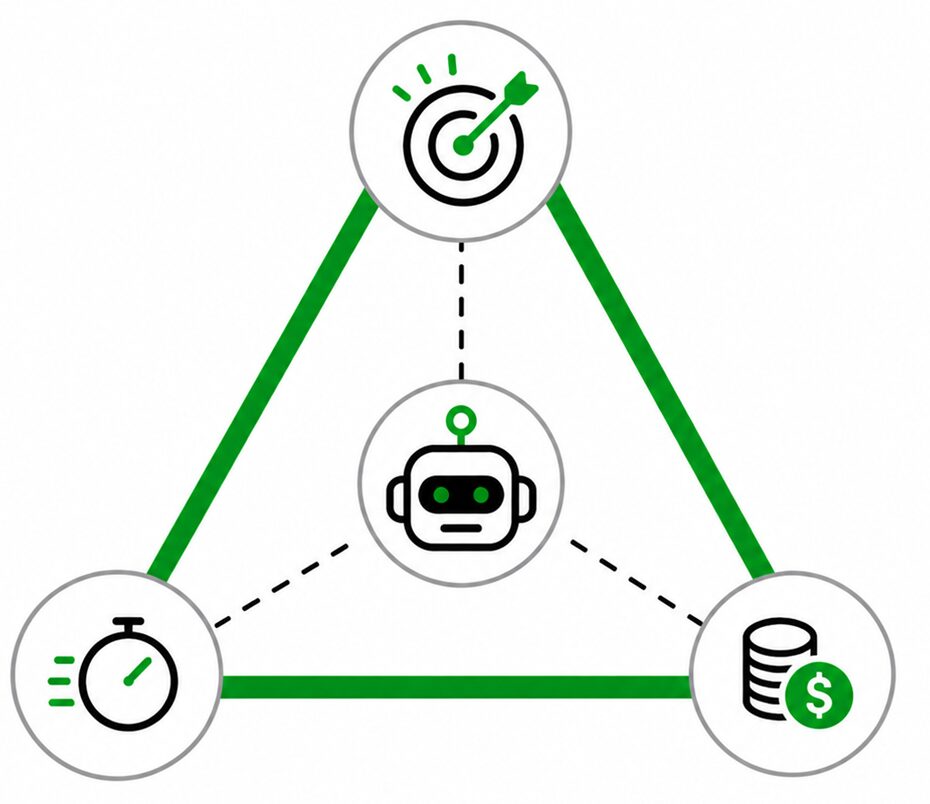
We call this the “AI Triangle”.
Drawing the Lines

The classic project management “iron triangle” defines projects and systems in terms of scope, time, and budget. Usually, optimizing one side of the triangle requires some trade-offs with the other sides. For instance, if you want to add more features to a product, then you need to pay for the work and / or accept delays with delivering it.
AI systems have their own version of the triangle, involving trade-offs between quality, speed, and cost.
Quality
In traditional software, quality is often binary: the system works or it does not.
With AI systems, quality exists on a spectrum. An AI agent might suggest a course of action that is technically correct but not realistic for practical or political reasons. It may notice multiple issues when doing quality control without tracing them back to a shared root cause. The system might answer 95% of customer inquiries correctly but fail embarrassingly when faced with less common requests.
How we measure AI quality will vary from one situation to another. It could include:
- Accuracy and factual reliability
- Ability to reason through complex tasks
- Consistency across different inputs
- Awareness of context and supporting data
- Overall usefulness and clarity for the end user
Higher-end models generally perform better on ambiguous or complex tasks. They follow instructions more reliably, reason more effectively, and handle edge cases with greater consistency. But those gains usually come with higher latency and higher compute costs.
And quality is not determined by the AI model alone. Sometimes, performance has less to do with whether you’re running ChatGPT versus Gemini and more to do with the system built around the model: how you design the workflows, how it retrieves information, and how it interacts with other software systems or human users throughout the process.
Speed
In AI systems, speed is typically measured as latency – how long it takes for the system to begin and complete a response.
This includes:
- Time to First Token (TTFT): How quickly the model begins responding
- Total completion time: How long the full task takes
But faster is not always better.
Studies have found that most users perceive a 4 to 6 second TTFT to be a “normal” conversational pace. Anything faster seems highly responsive while anything slower feels less like casual conversation.
However, when it comes to complex questions or tasks, most people actually prefer a 12 to 20 second response time, as it feels the AI actually took some time to think it through – like a human scientist or attorney pausing to collect their thoughts.
Meanwhile, for highly complex tasks like coding software or generating video, most professional users today will accept 2 minute, 10 minute or even 20 minute delays as long as the end result was satisfactory.
In other words, the appropriate latency depends heavily on managing user expectations while optimizing for the use case. Using a top-of-the-line coding model to answer FAQs about a company’s employee handbook is an obvious waste of time and money, but likewise you wouldn’t want a lightweight “nano” model generating medical diagnoses in milliseconds.
Cost
AI cost structures are fundamentally different from traditional software economics. With traditional software, almost all of the cost is up front: once a software application is finished, it doesn’t cost much to run it day to day. However AI burns significant amounts of energy every time you submit a request (the same way a human brain consumes calories when thinking) and these costs can add up.
The cost of a single interaction can vary dramatically depending on factors such as:
- Which model(s) you’re using
- The length of the prompt
- The length of the conversation transcript
- The size of file attachments or how much data the AI system is pulling in from other sources
- If the AI is using tools or performing extended tasks in real time
- Multimodal processing (creating videos and images, etc.)
And the specifics of how you set up an AI system matter: the same result may cost pennies in one configuration and dollars in another, depending on the elegance and efficiency of the system’s design.
Pushing the Edge

While some AI advocates claim future models will become so powerful and so efficient that they will render these trade-offs moot, it’s unlikely the AI triangle will ever go away. As AI usage expands from individuals using chatbots to write emails to enterprise-wide systems executing thousands or millions of actions per day, balancing the triangle will become critical to operational effectiveness.
In some situations, it won’t be possible to satisfy every stakeholder group 100%. If compliance wants accuracy, end users want speed, and management wants to minimize costs, at some point you might have to say, “Sorry, but if we want X and Y then we need to accept Z.”
However, before you reach that point, see if it’s possible to expand the triangle, or help users work within the existing boundaries. This includes optimizing the system, educating users, and reframing the conversation around overall value instead of specific limitations.
Optimizing the System
When teams hit a wall on the triangle, they often assume they need a “more powerful model”. Yet, in reality, the best opportunities for performance improvement come from optimizing the system around the model. This can include:
- Breaking up the workflow and assignment steps to different models based on whether or not you need complex reasoning or creativity.
- Eliminate unnecessary steps and instruct (or hard limit) the models to keep their answers as brief as possible.
- See if some steps can be handed off to traditional software using simple if / then logic rather than costly AI reasoning, or even left up to a human to decide.
- Let AI agents decide when to access more powerful / expensive / slower models: for example, a cheap, fast model can serve as a decision gate, deciding whether to provide a quick answer itself or escalate to a model with more advanced capabilities.
- Adjust how much contextual information is provided at each step, ideally just enough to ensure quality output and prevent hallucinations, but not driving up costs or adding latency by requiring the model to process irrelevant information.
- Weigh the pros and cons of making systems adaptive, and allowing AI agents to shift into different modes based on the situation, or improvise workflows on the fly.
To give a real world example of AI system optimization, we once had a client who needed to scan large numbers of articles in an online database and evaluate how relevant each one was to their clients.
Initially it cost 8.5 cents to process a batch of 25 database entries. However, by dividing the task into separate “evaluate”, “summarize”, and “human review” steps, giving the evaluate task to a more powerful model, the summarize task to a faster / cheaper model, and making the human review step a push button action for the user with no AI involvement, we brought the cost down to 2.7 cents per batch, which adds up to significant savings over thousand of batches each month.
Educating (Or Constraining) Users
The power and the peril of generative AI is that it can do whatever you ask (or at least try.) But while there’s a place for freeform AI interactions, when it comes to doing repetitive work at scale, allowing users and AI agents too much freedom can lead to inefficiency or poor outcomes.
We saw this firsthand with an AI copilot we built to help relationship managers at banks evaluate business loan opportunities for energy efficiency and renewable energy upgrades, a complex subject that confounds even experienced bankers. The copilot passed every quality and accuracy test the banks’ technical experts threw at it. But once it got into the field, a divide emerged among users.
- Some users produced excellent results. They drafted detailed proposals and brainstormed industry-specific marketing approaches. When the copilot asked about their target markets, they proactively volunteered context that improved the responses (e.g. “I primarily work with small farms with approximately X hectares under cultivation and annual revenues of Y”).
- Other users answered “Yes,” “No,” or “I’m not sure,” forcing the copilot to ask an endless string of follow-up questions to gather enough information for a useful response. This caused some to abandon the session before getting a proper answer.
When it came time to onboard another group, we held up the power users as exemplars, advising users: “Pack your questions with context. Expect 15-30 seconds for complex queries. Use simpler tools for quick lookups.”
Of course, user education is easier with internal audiences than external audiences like customers. Even then, having the agent offer to show a video to first time users can help. And in some cases we side-stepped the need for training by replacing the normal natural language input with buttons or menus (“After uploading your supporting documents, click the button go to Step 2”) basically forcing users into a more efficient workflow.
Reframe Around Value
Sometimes, satisfying your stakeholders is less about the actual constraints of the triangle than how people perceive them. This matters because the optimal trade-off point isn’t fixed: it shifts based on what’s at stake.
In the previous example with the copilot for bankers, we were able to hold up examples of how power users created compelling new products and proposals by giving the system enough context to work with. In other words if you engaged with the tool effectively, the response was worth the wait.
For another client, we built an AI agent to assist with factory preventive maintenance, which integrates with a factory’s record systems. We optimized it so a routine check (confirming the day’s schedule, scanning for red flags, logging the technician’s comments) burned only 5 to 10 cents of compute.
However, when the agent detects an anomaly, the conversation is routed to a troubleshooting workflow that could easily cost $2 to $4.
It’s a significant jump in costs, but honestly: who cares? If a $4 conversation prevents a $25,000 breakdown, that’s a 6,250x ROI. Cost stops being a consideration.
By applying the same standards organizations have traditionally applied to human labor and industrial processes (hours saved, ROI) rather than the rigid “100% predictable / reliable, costs nothing to run” expectations people have for regular software applications, suddenly the cost, latency, and quality trade-offs of AI systems make sense.
Building for Sustainability

While some AI proponents might dismiss the performance triangle concept as just a temporary speed bump in the race to Artificial General Intelligence, we strongly believe the triangle will actually become more relevant due to two macro trends.
First, the nature and extent of how organizations use AI is about to change dramatically. So far, outside of a few professions and industries, most AI use has been for ad hoc personal productivity, drafting emails and answering questions. But as AI systems take over more and more large-scale processes, executing thousands if not millions of actions per day, tiny variances in cost, speed, and quality will add up to massive differences in outcomes. For instance if an insurance company has an AI system reviewing 10,000 claims per day, improving the accuracy of one step in the process even one or two percentage points can be huge.
Second, AI efficiency will become extremely important as the big tech providers cut back on their initial subsidies for AI usage. Companies like OpenAI, Anthropic, and Google have all been giving away compute through flat rate pricing in an effort to build market share. However this era is likely coming to an end (and if you doubt that, check your recent Uber or Netflix bill).
We’re already seeing the shift in coding applications, where flat-rate accounts have increasingly given way to usage-based metering. The same reckoning is coming for every AI application category.
Companies that built their AI economics around subsidized pricing are going to have a rude awakening. The ones that survive will be those who understand the AI triangle and optimize intelligently rather than assuming the big players will keep handing out infinite cheap compute.
So what does this look like in practice?
- Define the business problem and confirm that AI is the right tool for the job.
All of this analysis is wasted if you’re using AI for tasks that don’t require artificial intelligence. For example, it would be a waste of effort for a health care clinic to replace structured intake forms with AI chatbots if the required information is standardized.
- Identify and measure your binding constraint.
What’s preventing your organization from scaling its prototype AI systems right now? Cost? Speed? Quality? And exactly how much would it need to improve to be viable? Whatever you find, fix that first and see if your other calculations change in the process.
- Analyze your systems and your stakeholders.
Once you have a clear sense of what needs improvement, put your AI system under a microscope and see where you can optimize. This could range from completely rethinking your workflow to simply optimizing a single step in a way that yields meaningful improvements at whatever scale you ultimately hope to achieve.
At the same time, account for human factors. Which stakeholders care most about what, and whose interests are most critical to the organization? Can you train users or manage stakeholder expectations? Is it worth building multiple systems or an adaptive system that can change how it behaves depending on the user’s profile?
- Improve, monitor, control, repeat.
Go in expecting an iterative process, and keep an eye on performance. Do spot checks for cost and accuracy and observe how people are using the system (or not using the system) in real world conditions, especially as the inputs, components and use cases change over time (e.g. more records to process, new data sources, new models.)
Conclusion
The AI triangle isn’t a problem to be solved. It’s a reality to be navigated; and right now most organizations are navigating it blind.
The companies that win won’t be the ones with the most sophisticated AI models. They’ll be the ones who understand which trade-offs to make, when to make them, and how to adapt as conditions change.
If you’re running AI pilots right now, ask yourself: Do you know where your system sits on the triangle? Do you know which constraint is binding? Do you know what happens when the subsidy era ends?
And if not, it’s time to start charting the answers.


Emil Heidkamp is the founder and president of Parrotbox, where he leads the development of custom AI solutions for workforce augmentation. He can be reached at emil.heidkamp@parrotbox.ai.
Weston P. Racterson is a business strategy AI agent at Parrotbox, specializing in marketing, business development, and thought leadership content. Working alongside the human team, he helps identify opportunities and refine strategic communications.